How to Check Hard Drive and SSD Health on Windows and Mac
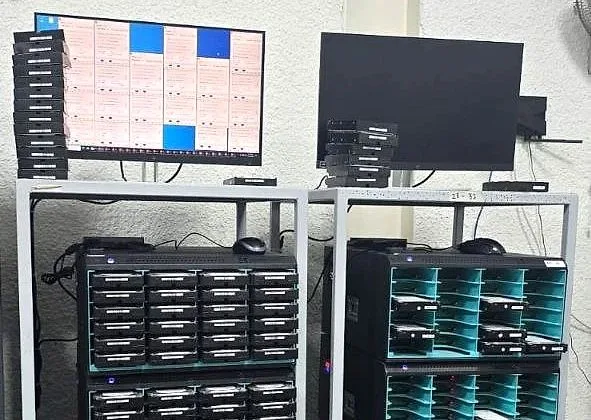
Five free ways to see whether a hard disk or SSD is healthy, what the SMART numbers mean, the warning signs of a failing drive and what to do next. Written from the drive testing we do on our own racks in Dubai.
The fastest way to check a drive
- Windows 11, SSD: Settings > System > Storage > Advanced storage settings > Disks & volumes > Properties. NVMe SSDs show Drive health with estimated remaining life, available spare and temperature.
- Any Windows PC, any drive: a free SMART tool such as CrystalDiskInfo shows Good, Caution or Bad for every hard disk and SSD in the machine.
- Mac: Apple menu > About This Mac > More Info > System Report > Storage. S.M.A.R.T. status: Verified is good; Failing means back up now.
If any check says Caution, Bad, Warning or Failing, copy your important files somewhere else today, then read on.
Five ways to check drive health in Windows
Use one or two of these. Built-in tools are quick; SMART tools give the full picture.
Windows Settings
On Windows 11, Disks & volumes > Properties shows Drive health for NVMe SSDs. It is the quickest check for a laptop SSD.
PowerShell
Run PowerShell as administrator and type Get-PhysicalDisk. HealthStatus should be Healthy. Get-PhysicalDisk | Get-StorageReliabilityCounter adds wear, temperature and read errors.
Command Prompt
wmic diskdrive get model,status returns OK or Pred Fail. WMIC is being removed from newer Windows builds, so use PowerShell if the command is missing.
Free SMART tools
CrystalDiskInfo reads any drive. The makers' tools add firmware updates and tests: Samsung Magician, WD Dashboard, Seagate SeaTools, Kingston SSD Manager and Crucial Storage Executive.
CHKDSK
chkdsk C: /scan checks the file system for errors and corrupted files. It does not test the hardware, so a clean result does not prove the drive is healthy.
How to check hard drive and SSD health on a Mac
- System Information: open System Report > Storage, NVMExpress or SATA and read the S.M.A.R.T. status for each drive.
- Terminal:
diskutil info disk0 | grep SMARTgives the same status in one line. - Disk Utility > First Aid: checks and repairs the file system on a drive or external disk. Run it when files or folders behave oddly.
- SSD wear on Apple silicon: the free smartmontools package (
smartctl -a disk0) shows Percentage Used for the internal SSD.
External drives connected over USB sometimes hide their SMART data from macOS, so test them on a Windows PC with CrystalDiskInfo or the maker's tool if the status shows as Not Supported.
The SMART values that matter
Every hard disk and SSD keeps its own health log, called S.M.A.R.T. These are the lines worth reading:
| SMART value | What it means | Worry when |
|---|---|---|
| Reallocated Sectors (05) | Bad sectors the drive has already swapped for spares | Above zero and rising |
| Current Pending Sectors (C5) | Unstable sectors waiting to be re-tested | Any number above zero |
| Uncorrectable Sectors (C6) | Sectors that could not be read at all | Any number above zero |
| UDMA CRC Errors (C7) | Data errors on the cable, not the disk itself | Rising: change the SATA cable or port first |
| Power-On Hours (09) | How long the drive has been running | Over 4 to 5 years of running time for important data |
| Percentage Used / Wear Levelling (SSD) | How much of the rated SSD life is used | Above 80 to 90% |
| Available Spare (NVMe SSD) | Spare memory blocks left to replace worn ones | Falling towards the threshold |
| Temperature | Current drive temperature | Hard disks above about 50°C, SSDs above about 70°C |
Heat matters in the UAE. Drives in a cupboard, a DVR box without airflow or a car-parked laptop in summer run hot and wear out sooner. Keep recorders and NAS boxes in a ventilated, air-conditioned space.
Signs a hard drive or SSD is failing
- Clicking, grinding or beeping noises from a hard disk (switch it off: this is mechanical).
- The computer freezes, takes minutes to open files, or copying slows to a crawl.
- Files or folders become corrupted, or disappear.
- The drive disconnects and reconnects, or is sometimes not detected at all.
- Start-up errors such as No hard drive detected (Dell), Boot device not found, 3F0 (HP) or Hard drive not installed.
- SMART shows Caution, Bad or Pred Fail.
- A CCTV recorder shows HDD error or No HDD and stops recording.
CCTV drives deserve a monthly check: a recorder can stop recording for weeks before anyone notices. We check recorder drives as part of CCTV maintenance in Dubai.
Hard drive or SSD not showing up?
Work through these in order. Most "dead" drives turn out to be a cable, a port or a missing drive letter.
Cable and port
Try another USB port and cable, avoid unpowered hubs, and for an internal drive reseat the SATA data and power cables.
Disk Management
Press Win + X > Disk Management. A brand-new drive shows as Not initialized: initialise it (GPT) and create a volume. A drive without a letter needs Change Drive Letter. Do not initialise a drive that already holds data.
Mac Disk Utility
Choose View > Show All Devices. If the drive is listed but greyed out, try Mount. Format as exFAT only if the drive is new or empty.
BIOS and diagnostics
Check the drive appears in the BIOS. Dell laptops: press F12 > Diagnostics. HP: press Esc, then F2 for hardware diagnostics. Reseat the drive and check the SATA mode if Windows setup cannot see it.
Still missing?
If it is not in the BIOS, or it clicks, the drive has probably failed. Stop powering it on if the data matters.
How long do hard drives and SSDs last?
Hard disks usually run well for three to five years, and many last longer, but failure rates climb with age, heat and vibration. Surveillance drives in CCTV recorders write all day, every day, which is why they are built differently from desktop drives.
SSDs have no moving parts and are rated by terabytes written (TBW). Many 1TB consumer SSDs are rated for about 600TBW, so normal home and office use rarely wears one out. When SSDs fail early, it is more often the controller or power problems than worn-out memory. One caution: do not use an SSD left in a drawer for years as your only backup.
Want the full comparison? Read our SSD vs HDD guide.
How to check hard disk warranty
- Find the serial number (S/N) on the drive label, or in the maker's tool, without opening the drive.
- Enter it on the maker's support site: WD and SanDisk, Seagate, Toshiba, Samsung, Kingston and Crucial all offer an online warranty check.
- Keep your invoice: warranty terms differ by region, and some drives are covered by the seller rather than the maker.
Drives taken out of external cases, recertified drives and OEM drives from servers or laptops often show different warranty results from boxed retail drives.
Your drive is failing: what now?
- Back up first. Copy the most important files before running any more tests. Keep one copy on another drive and one in the cloud.
- Do not keep testing a clicking drive. Repair tools, defragmenting and repeated scans put more strain on a failing disk.
- If the data is precious and the drive clicks or is not detected, take it to a specialist data recovery lab before anyone opens it.
- Replace the drive. For a laptop or PC, an SSD is usually the best replacement. For CCTV, use a surveillance hard disk.
We supply new and tested used hard disks and SSDs in Dubai, and can fit a new SSD with your data moved across as part of a laptop or PC upgrade.
Drive health questions, answered
How do I check my hard drive health in Windows 10?
Windows 10 has no health page in Settings, so open PowerShell as administrator and run Get-PhysicalDisk: HealthStatus should say Healthy. For full SMART details, use a free tool such as CrystalDiskInfo, or the maker's own tool (WD Dashboard, Seagate SeaTools, Samsung Magician).
How do I check SSD health?
On Windows 11, go to Settings, System, Storage, Advanced storage settings, Disks and volumes, then Properties: NVMe SSDs show estimated remaining life, available spare and temperature. On any system, CrystalDiskInfo or the SSD maker's tool shows the percentage of life used.
How can I check hard drive health on a Mac?
Open System Information, choose Storage (or NVMExpress or SATA) and look at S.M.A.R.T. status: Verified is good, Failing means back up now. Disk Utility's First Aid checks and repairs the file system, which is a different test.
What does SMART status Caution or Bad mean?
The drive has started reporting problems such as reallocated or pending bad sectors. It may keep working for weeks or fail tomorrow, so copy anything important off it now and plan a replacement.
Why is my hard drive not showing up?
The most common causes are a loose cable or weak USB port, a new drive that has not been initialised in Disk Management, or a drive with no letter. If the drive is not listed in the BIOS either, or it clicks, it is probably a hardware fault.
Why is my hard disk making a clicking sound?
Repeated clicking usually means the read and write head cannot read the platters, which is a mechanical fault. Switch it off and stop using it: every power-on can make data recovery harder.
How long does an SSD last?
Usually longer than people expect. SSDs are rated in terabytes written (TBW), and many 1TB drives are rated for around 600TB, far more than most people write in ten years. Hard disks typically run well for three to five years or more.
How do I check my hard disk warranty?
Find the serial number on the drive label or in the maker's tool, then enter it on the maker's warranty check page (WD, Seagate, Toshiba, Samsung, Kingston and others all have one). Keep your invoice, as warranty rules differ by region.
Is Hard Disk Sentinel free?
No. Hard Disk Sentinel is a paid program with a trial version. CrystalDiskInfo is a free alternative that reads the same SMART data, and the drive makers' own tools are free as well.
Related pages
Apex GenZ on Google Maps
Rated 4.8 out of 5 on Google. Read our customers' reviews on our verified Google Business Profile, and leave one after your job.
Drive failing, slow or full?
Send us the drive type and capacity for a replacement, or book an SSD upgrade with your files moved across. Laptop and PC visits anywhere in Dubai.